Introduction
nuxt-gsheet is a zero-config, high-performance, and secure Google Sheets integration module for Nuxt 3 and Nuxt 4. It allows you to seamlessly use Google Sheets as a lightweight CMS or database with server-side proxy security, stampede-proof caching, multi-authentication modes, and a dedicated Nuxt DevTools tab.
Why nuxt-gsheet?
Google Sheets is a popular choice for content management, prototype databases, and quick data storage due to its familiarity and collaborative real-time editing. However, directly querying Google Sheets from a frontend application presents several challenges:
- Security Risks: Exposing raw Spreadsheet IDs, API Keys, or Service Account credentials on the client side leads to unauthorized access and API key theft.
- Quota & Rate Limits: Frequent client-side requests quickly exhaust Google API quotas or trigger Google Apps Script execution throttles.
- Cache Stampede: When multiple concurrent users visit your site during cache expiration, hundreds of simultaneous requests hit Google API endpoints, causing rate limit errors (HTTP 429).
- Setup Complexity: Switching between public sheets, Google Apps Script proxies, GViz endpoints, and private Service Accounts usually requires writing custom backend proxies.
nuxt-gsheet solves all of these problems out of the box with a zero-config Nuxt module.
Key Features
- ⚡️ Multi-Auth Auto-Detection: Supports Google Sheets API v4 (API Key & Service Account), Google Apps Script Web App proxies, Google Visualization API (GViz), and direct CSV exports.
- 🔒 Secure Server Proxy: Intercepts requests on the server side (
/api/_gsheet/*). Credentials and spreadsheet endpoints remain strictly hidden from the browser. - 🛡️ Cache Stampede Protection: Serves stale cache when network or quota limits fail, and collapses concurrent identical requests into a single upstream request.
- 🧪 Type-Safe Composables: Provides auto-imported Vue composables (
useGSheet,useGSheetAsObject,useGSheetRow, anduseGSheetWrite) with full TypeScript auto-completion. - 📊 Nuxt DevTools Integration: Monitor intercepted API calls, cache hit/miss ratios, active auth modes, and estimated quota usage directly within your Nuxt DevTools.
How It Works
nuxt-gsheet acts as a middleware bridge between your Nuxt application and Google Sheets.
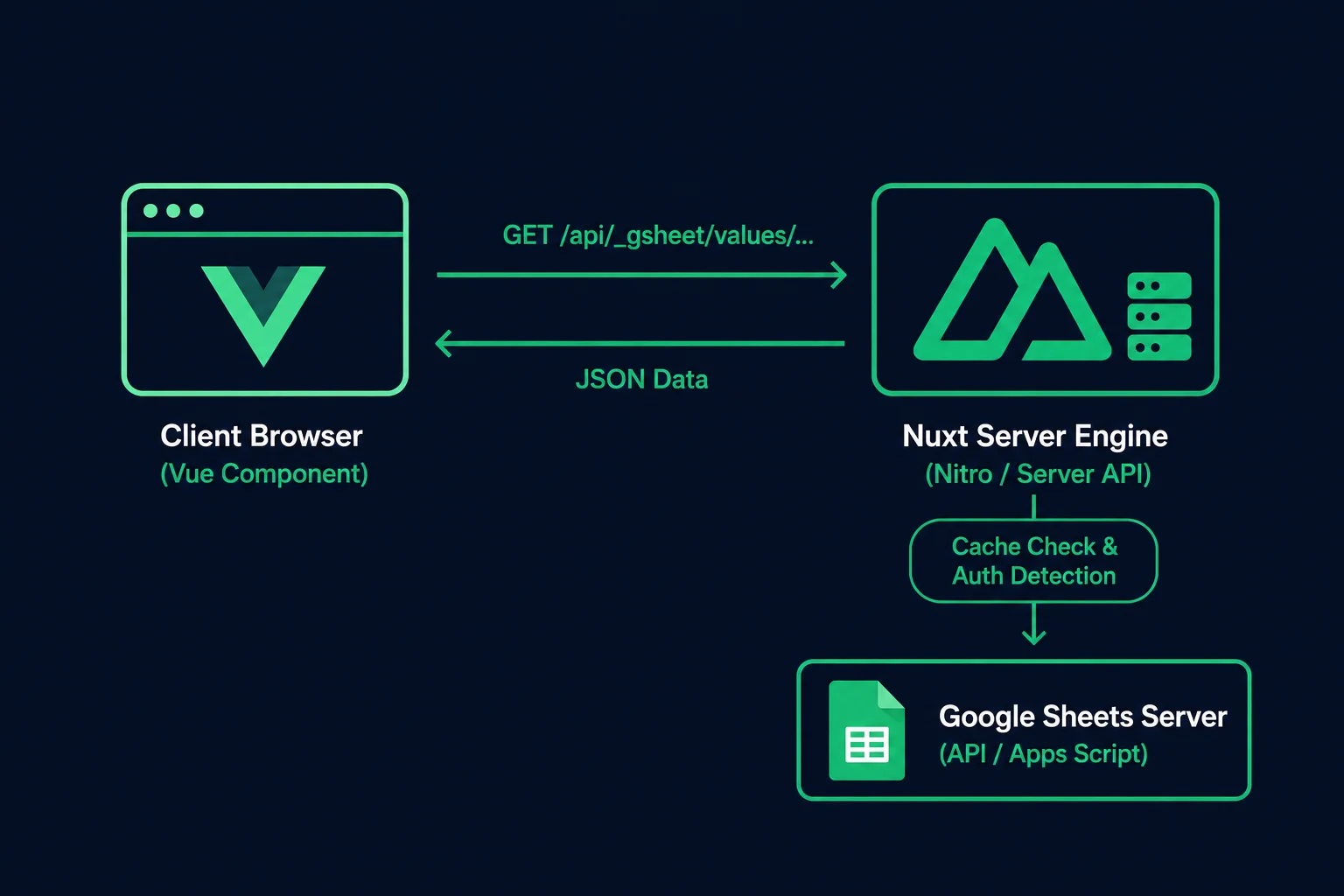
- Client Request: Your Vue component calls a composable such as
useGSheetAsObject('A1:C10'). - Server Handling: The request is routed to Nuxt's internal server engine (
/api/_gsheet/*). - Cache & Stampede Check: If valid data exists in the cache, it returns immediately. If data is stale or missing, only one request is dispatched to Google Sheets regardless of how many client components requested it simultaneously.
- Data Formatting: Raw cell values are converted into structured JavaScript objects or arrays and returned safely to your client application.
Prerequisites
Before getting started, ensure your environment meets the following requirements:
- Nuxt: Version
^3.10.0or Nuxt4.x - Node.js: Version
^18.0.0or higher (or Bun^1.0.0)
Next Steps
Now that you understand the core concepts of nuxt-gsheet, you are ready to set it up in your project: